Tell the Story
Turn the numbers into a story you can defend.
Build board packs, investor updates, and management reports from governed numbers, repeatable analysis, and evidence you can inspect.
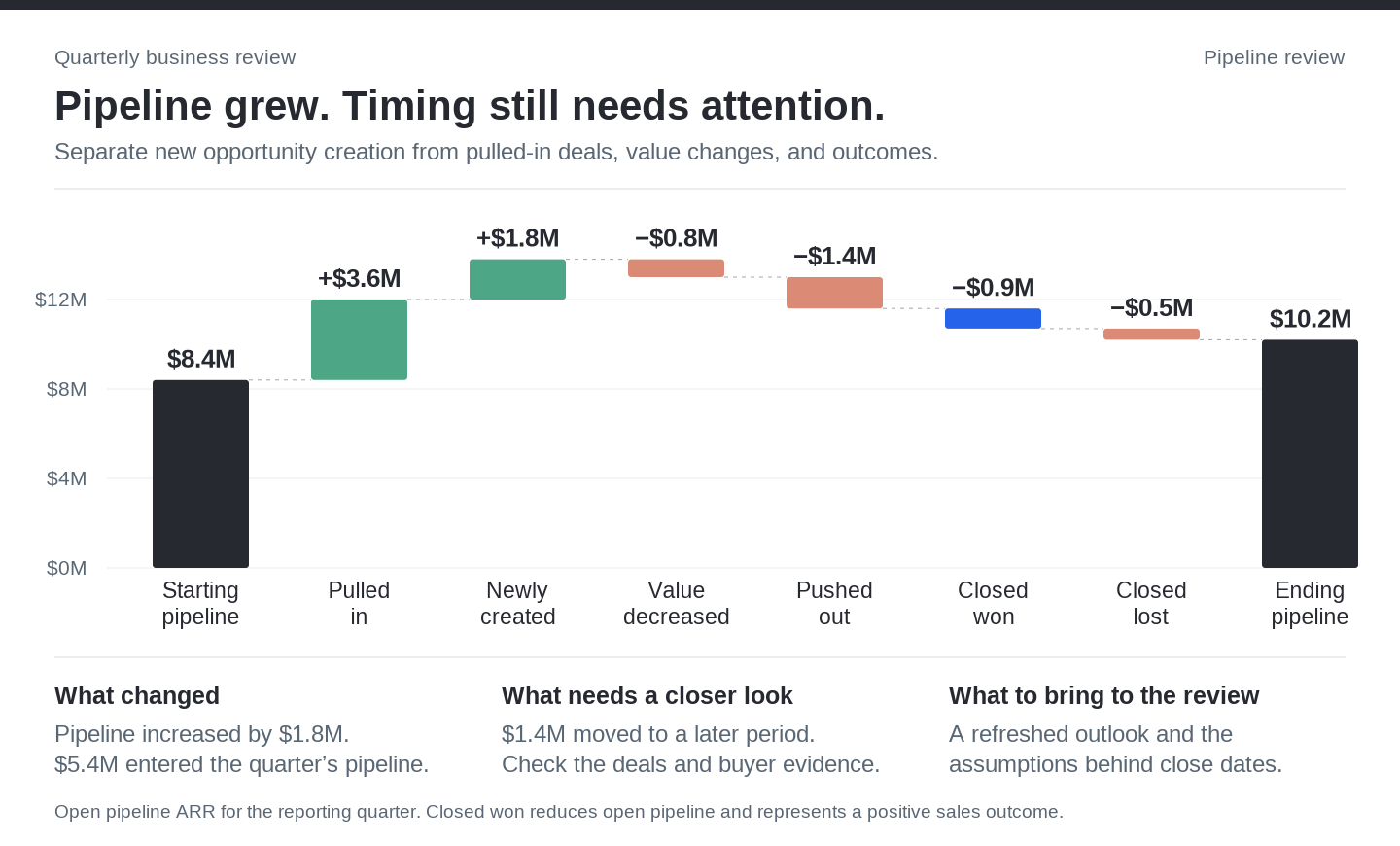
Put the movement, explanation, and decision on the same page. A reporting package connects the headline to the analysis and supporting schedules.
The headline needs numbers that hold together.
Board prep gets harder when every chart comes from a different export, definition, or reporting period.
Bring operating and finance measures into an agreed reporting method. Compare actuals with goals, explain the forecast, and retain the segment and entity detail behind the totals.
Keep bookings, ARR, and recognized revenue distinct. Carry the same definitions into the slides, supporting schedules, and follow-up analysis.
Explore business performance metricsGround the reporting narrative in actuals against plan. Keep the comparison period, goal values, and underlying results together before turning them into a board slide.
Keep the reporting method. Refresh the work.
The recurring effort belongs in Recipes and skills, so the next cycle can build on the last.
01
Refresh the analysis
Recipes run the agreed calculations, comparisons, and quality checks on current data. Keep the reporting period, filters, and metric definitions consistent.
Explore Recipes02
Apply your reporting conventions
Organization skills carry the template, terminology, materiality rules, and review instructions. Reuse the way your company reports every cycle.
Explore Desktop and skills03
Prepare the package for review
Claude or Codex uses QFlow through Desktop and MCP to build the charts, draft the narrative, and format the deliverable. Your team reviews the findings and decides what to share.
See how the evidence holds up
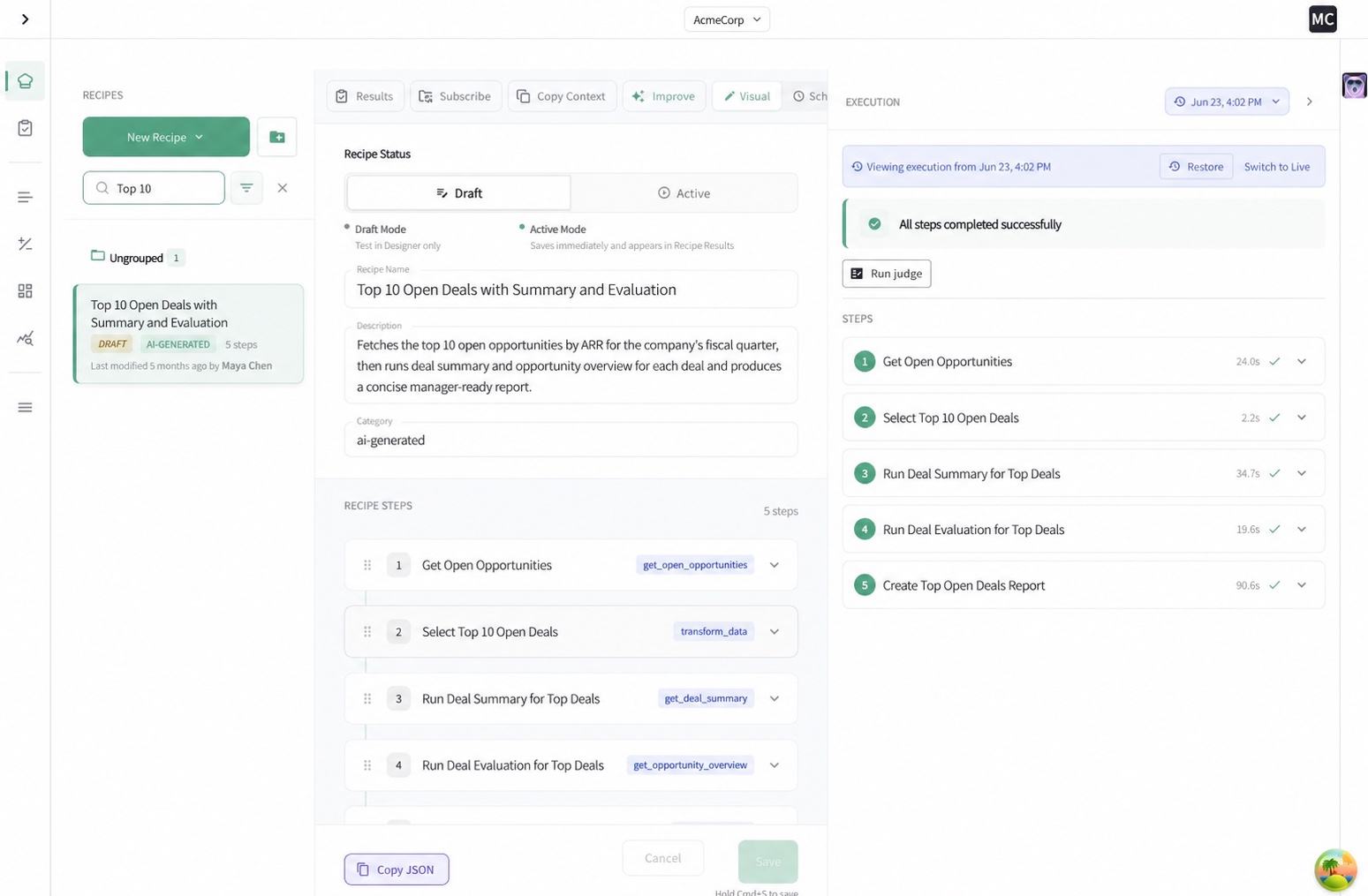
Make the analytical method inspectable. Recipes keep the steps and outputs together, so a recurring report can reuse the same method and a reviewer can examine the result.
Change the audience. Keep the facts consistent.
A board member, investor, and operating leader need different detail. They should still recognize the same business.
Board packs
What changed, and what decision do we need?
- Connect results against plan with the forecast, material risks, and the choices in front of the business. Keep the detailed schedules available for questions.
Investor updates
How is the business progressing?
- Carry consistent growth, retention, and efficiency measures from one update to the next. Explain meaningful changes in the context of the plan.
Management reporting
Where should the team focus?
- Give each function, segment, or entity the detail it needs while preserving the definitions behind the company-wide view.
Be ready for the question behind the slide.
A useful narrative explains what changed, what the evidence supports, and what the team needs to decide.
Inspect the contributing deals, customer context, or assumptions. Separate the measured change from the proposed explanation. Keep missing evidence visible in the review.
Use Claude or Codex with QFlow Desktop and MCP to investigate a follow-up question. Carry a useful new analysis into the next reporting cycle through the recipe and skill.
Bring your AI into the reporting processGive a headline the supporting detail it deserves. A recipe can assemble the deal context, recent changes, and evidence gaps for the next question in the room.
Building a repeatable reporting cycle
Can we keep our existing board deck or reporting template?
Yes. Use your template as part of the reporting workflow and capture its layout, metric definitions, commentary conventions, and review requirements in an organization skill. Claude or Codex can then use the skill and QFlow recipe outputs to refresh the package. The workflow needs to be configured for your template and sources.
What is the difference between a Recipe and an organization skill?
A Recipe defines a repeatable analytical method, including data inputs, filters, calculations, and outputs. An organization skill tells Claude or Codex how to use those capabilities for your reporting process: which template to follow, what to explain, and what to check before the package is ready for review.
How do we check a number or challenge an explanation?
Inspect the metric definition, reporting period, source records, and recipe execution supporting the result. Keep supporting schedules with the package and distinguish measured changes from proposed explanations. An AI-written explanation still needs review, especially when the available evidence does not establish a cause.
Can the same reporting process cover multiple entities?
Yes. Use the agreed measures across connected entities, roll them up for the group, and retain entity-level detail for the supporting schedules. Set the reporting periods, currency treatment, and any consolidation rules in the method so comparisons stay meaningful.
Is this only for sales and pipeline reporting?
No. Build the package around your available operating and finance data. It can include bookings, revenue, retention, efficiency, workforce, and headcount measures alongside the forecast and plan. Each measure needs an agreed definition and a reliable input. Bookings, ARR, and recognized revenue should remain clearly distinguished.
Does QFlow send the finished report automatically?
Recipe findings can be delivered through Slack, Microsoft Teams, email, or a webhook. For a board pack or investor update, keep a review step in the workflow before sharing the final deliverable. Your reporting process determines the audience, format, and approval requirements.
Make the next reporting cycle easier to repeat.
Start with a package your team already prepares. Bring the template, the definitions, and the questions it needs to answer.