Sales Forecasting
Forecast the number. Explain every deal.
Bring rep judgment, pipeline evidence, and AI deal insights into one forecast review. See what is likely to close, what changed, and where your team needs to act.
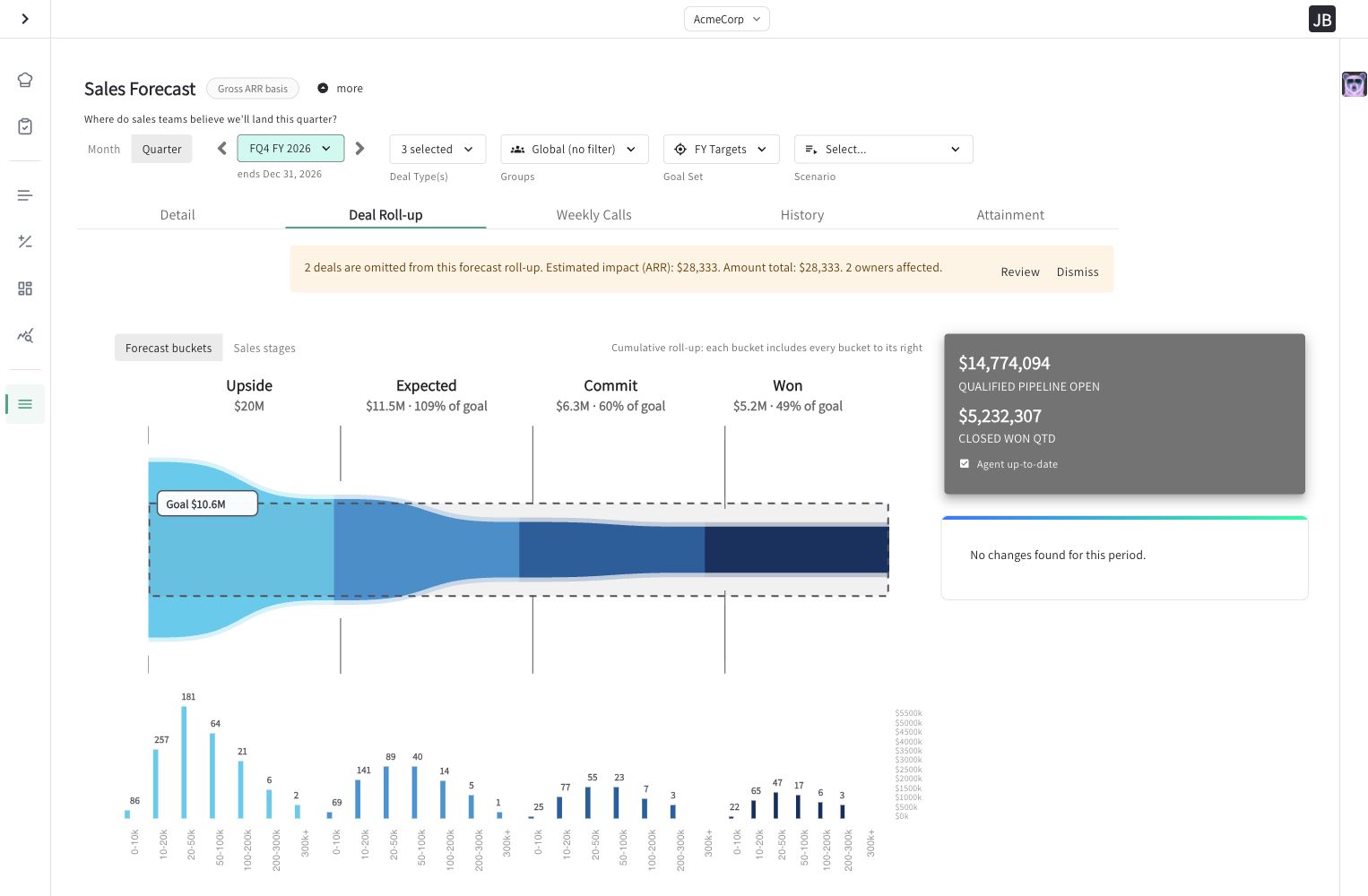
See the pipeline behind the forecast, its relationship to the goal, and the exceptions that need review. Cumulative buckets keep the rollup consistent. Values use a Gross ARR basis.
Trusted by








Pressure-test the call from three angles.
A rep's judgment and a CRM rollup answer different questions. Bring them together with the history of what changed to make a more informed call.
The team's call
Keep expected and commit submissions from reps and forecast owners beside their commentary. Preserve the judgment behind the number.
The deals supporting it
Compare opportunity rollups by stage and forecast bucket. Follow the total into the deals that explain it.
What changed
Review forecast history, bucket changes, and pipeline movement. Bring the differences into the conversation while there is still time to act.
AI deal insights
Find the risk behind the commit.
QFlow brings AI deal summaries and evaluations into the opportunity context. Review the risks, inspect supporting evidence, and agree on the next step with the rep.
- Compare opportunity age and time in stage with company benchmarks.
- Spot close-date slips and past-due commitments.
- Review stage exit criteria and supporting evidence where available.
- Use AI evaluations and recommended actions to focus the deal discussion.
The team’s judgment stays visible. AI adds context for the decision.
See the gap. Know where it sits.
Connect the forecast conversation to bookings and quota attainment. See new business, renewals, and expansion by rep, manager, or quota group, then inspect the fiscal year or current period.
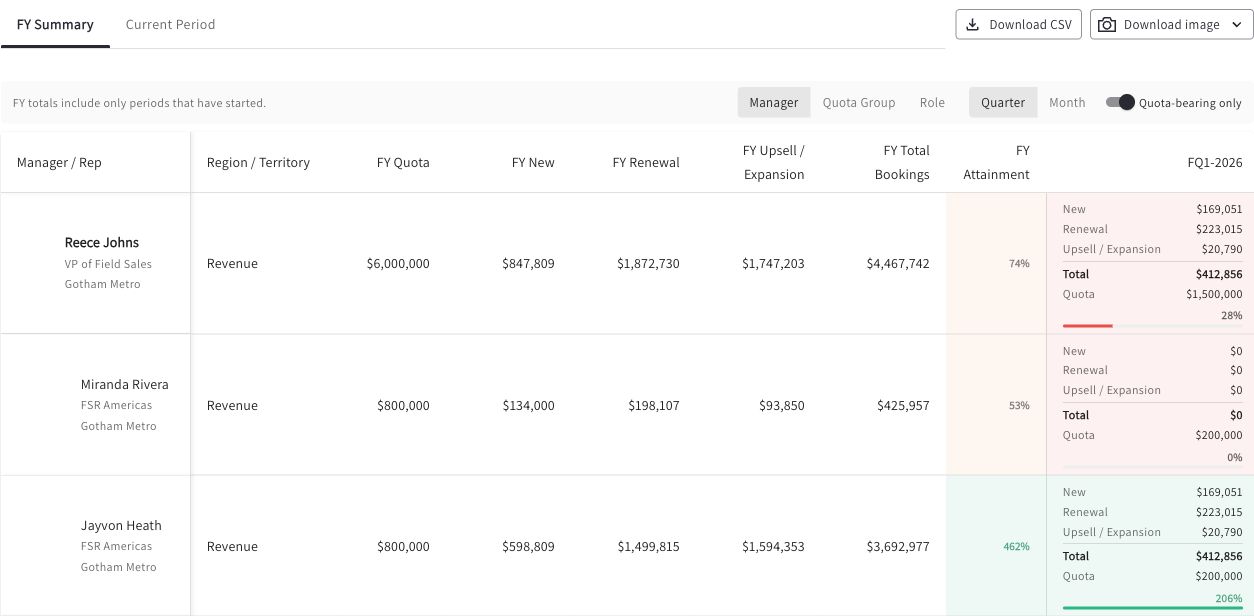
Bring assigned quota, bookings, and attainment into one operating view. Compare progress across reps and periods before focusing the next sales review.
Keep company goals and assigned quotas distinct. Use the relevant target for the discussion, then follow the totals into the reps and opportunities behind them.
Make each call build on the last.
Keep submissions, deal commentary, and forecast history connected. Start with what changed and leave with a clear view of what needs attention.
- Prepare with the evidence
- Review the current rollup, recent changes, and AI deal evaluations. Identify the opportunities and assumptions worth discussing.
- Capture the team's judgment
- Collect expected and commit submissions with key-deal commentary. Use Weekly Calls to keep the review anchored to the latest submissions.
- Follow through at the next review
- Return to the forecast history and attainment view. See what closed, what moved, and where the team's call needs to change.
Know what the number includes.
Review omitted opportunities and data-quality exceptions before relying on a total. Keep the reporting period, metric basis, and selected team in view.
Explore what could close the gap.
Take the current pipeline into scenario planning. Test assumptions about future pipeline, conversion, deal size, and timing to see what the plan depends on.
Before your next forecast call
Does AI replace the rep's or manager's forecast?
No. Rep and forecast-owner submissions remain part of the review. QFlow puts those judgments beside opportunity rollups, deal context, and forecast history. AI summaries and evaluations surface risks and suggested actions; your team makes the call.
What is behind an AI deal insight?
The opportunity context brings together lifecycle signals such as age, time in stage, close-date changes, and stage exit criteria, with supporting evidence where available. Review that context alongside the AI summary and evaluation before deciding what to do next.
How do the forecast buckets roll up?
The cumulative view includes the buckets to its right: for example, Expected includes Commit and Won. QFlow labels that relationship in the chart so the team can read the forecast consistently. You can also switch to the sales-stage view to inspect the pipeline by stage.
Can we compare performance with both quota and company goals?
Yes. Forecast views put the call in the context of configured company goals, while Attainment shows bookings against assigned quota. Review new business, renewals, and expansion across the fiscal year or current period, with manager, quota-group, and role views. Company goals and assigned quotas stay distinct.
How does this connect to scenario planning?
Use the current pipeline as the starting point, then explore assumptions about future pipeline, conversion, deal size, and timing in QFlow's scenario planning. Compare what would need to change to close a gap, and revisit the assumptions as actual results arrive.
Bring a forecast you can stand behind.
The team’s judgment. The deals supporting it. The changes that matter.