Business Digest
Know what changed. Before the meeting.
Turn pipeline movements, forecast changes, and material deals into a focused business briefing. QFlow Recipes deliver it automatically through Slack, Teams, email, or a webhook.
Open the interactive tour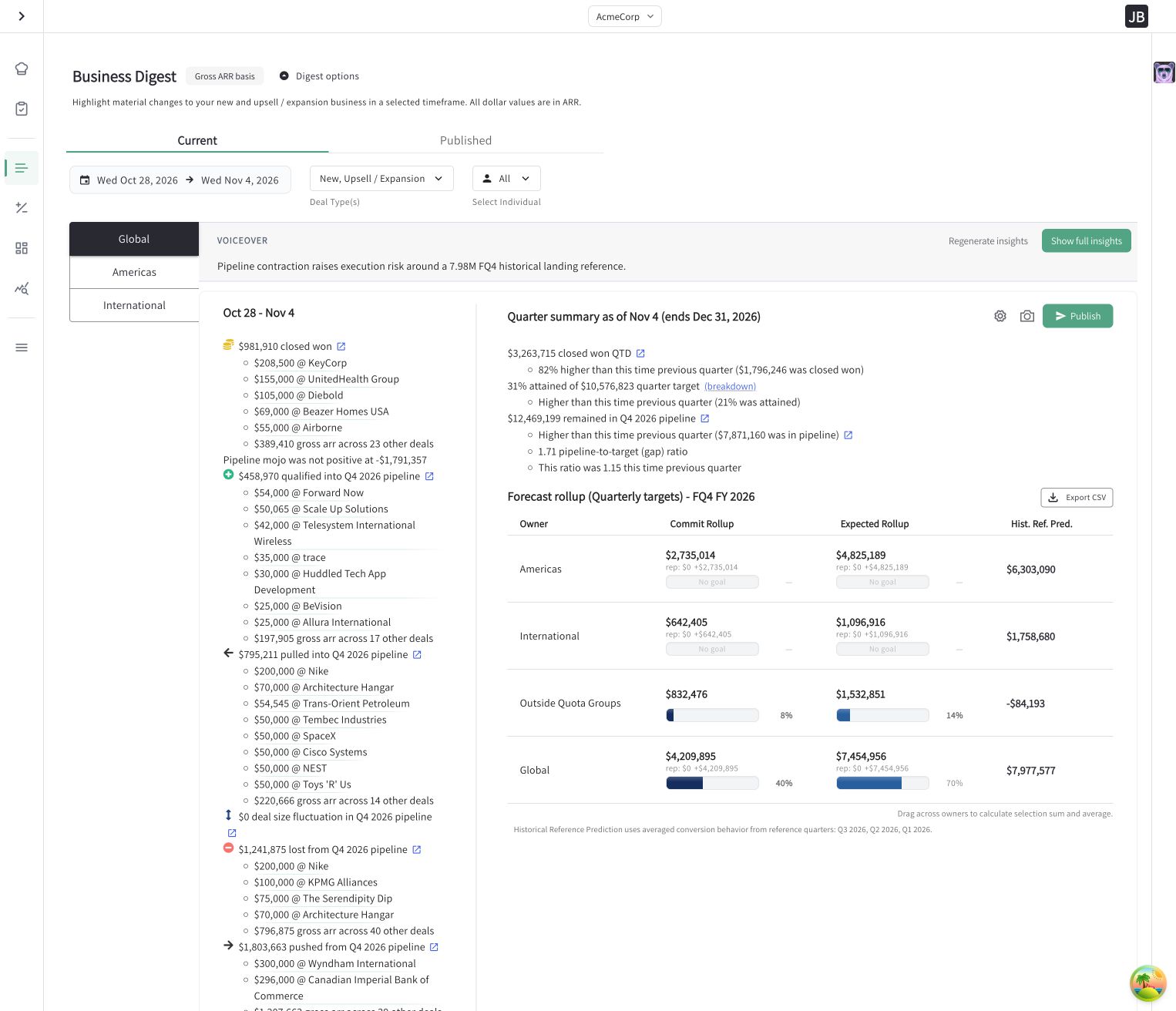
Business Digest brings pipeline movement, goal progress, and forecast context into one extensible briefing. Follow the changes that matter and use Recipes to deliver them to your team.
Trusted by








Get to the decisions sooner.
Give Sales, RevOps, and leadership a shared account of what changed. Arrive ready to discuss the deals, risks, and actions that matter.
What moved?
See closed-won business, newly qualified pipeline, deals pulled into the quarter, and deals pushed or lost from it.
What matters?
Set materiality thresholds so deal callouts reflect your team's goals or the size of the change.
Where do we stand?
Put the period's changes beside quarter-to-date results, remaining pipeline, and your selected management forecasts.
Go from the headline to the deals.
Open the opportunities behind a digest total. Review the owners, accounts, dates, and values that explain the change before deciding what to do next.
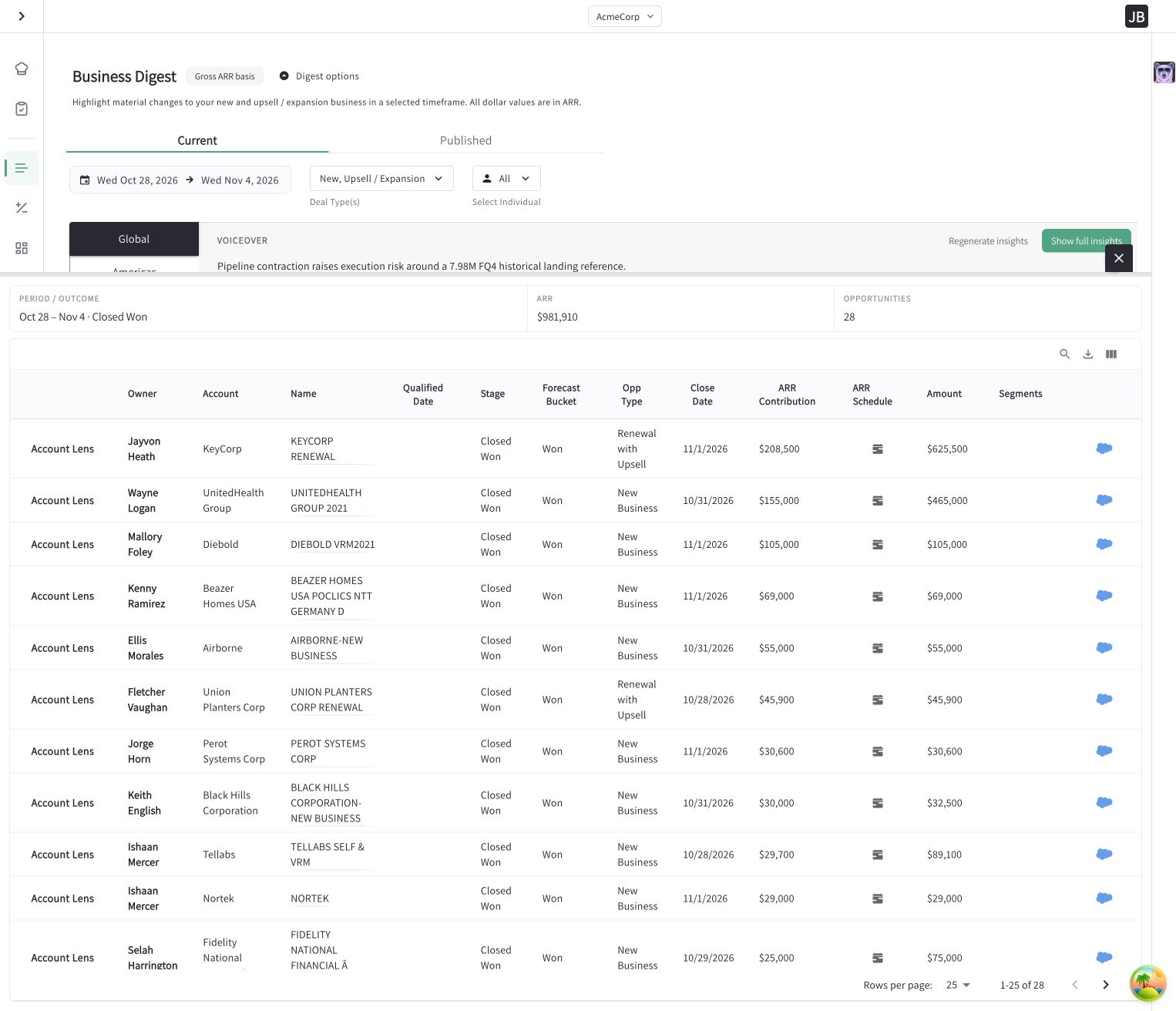
Move from a headline total to the deals behind it. Review owners, dates, stages, and values before deciding which opportunities need attention.
Make the update fit the team.
A leadership rollup and a regional sales review need different context. Choose the group, period, and materiality rules that suit the conversation.
- Move between the global view and your configured team groups.
- Set deal-callout thresholds against a quarterly goal or change category.
- Separate newly qualified pipeline from deals pulled into the quarter.
- Include forecast bucket changes and selected management submissions.
Put the briefing on a schedule.
Business Digest is part of the work you can run with QFlow Recipes. Combine the numbers with AI commentary, then deliver a consistent update wherever your team needs it.
- Make it a repeatable workflow
- Use Business Digest as an analytical tool inside a QFlow Recipe. Build the briefing into the recurring work your team already runs.
- Deliver where the team works
- Send the update through Slack, Microsoft Teams, email, or a webhook. Put the briefing in the conversation or workflow where the next action happens.
- Set the rhythm for the business
- Prepare the Monday leadership briefing, a regional pipeline review, or a regular forecast update. Run it on a schedule so the discussion starts with what changed.
“This feature easily saves me an hour each week. The first time I looked at it, it highlighted a deal that pushed and I had missed it.”
Before your next business review
What does a Business Digest include?
The selected period's closed-won business and pipeline changes, such as newly qualified opportunities, deals pulled in, deals pushed out, and losses. Depending on your configuration, it can also include forecast bucket changes, quarter-to-date progress, and selected management forecasts.
How do materiality thresholds work?
Choose the deal-callout threshold as a percentage of the team's quarterly goal or the total for a change category. Configure the threshold for the relevant group so the digest highlights the changes that merit attention in that team's review.
Can we inspect the opportunities behind a number?
Yes. Open a digest total to inspect the underlying opportunity records, including owners, accounts, dates, stages, and the relevant values. Keep the reporting period and metric basis in view when reviewing the details.
What does AI do in the digest?
AI turns the digest's results into a business narrative: what moved, where attention is needed, and what to bring into the review. The calculated metrics and underlying opportunity records stay connected to the story, and your team can add its own context.
Can we send digests automatically?
Yes. Business Digest is available as an analytical tool in QFlow Recipes. Build it into a recurring recipe and deliver the briefing through Slack, Microsoft Teams, email, or a webhook. The same update can become part of a leadership meeting, a team conversation, or another automated workflow.
Make the next review about what to do next.
Bring the numbers, the narrative, and the underlying deals into one recurring briefing.