Business data integrations
Connected data. Repeatable answers.
Bring CRM, finance, and customer conversations into one governed foundation. Give Claude and Codex the definitions and vetted inputs behind your forecasts, plans, and reporting.
See which systems are connected, whether the initial sync is complete, and which data still needs configuration. Connection status and analytical readiness stay distinct.
Trusted by








The systems behind the number. The context behind the deal.
Connect structured records and unstructured evidence so the next question can cross systems without starting with another set of exports.
Sales and marketing
Bring accounts, deals, campaign activity, and engagement into the same analysis.


Salesforce, HubSpot, Marketo, Pardot, and Apollo
Finance and accounting
Connect the commercial story to billing, revenue, and financial actuals.




NetSuite, QuickBooks, Sage, and Xero
Customer conversations
Add call recordings and transcripts to the evidence behind deal summaries and win/loss insights.


Gong, Salesloft, and Clari Copilot
Warehouses and custom data
Use existing data platforms and bring in the files or business-specific inputs your analysis needs.


Snowflake, BigQuery, Redshift, Databricks, S3, SQL databases, and Zoho Analytics
Connection methods and available records vary by source. We can review your systems, permissions, and required history together.
Keep what customers said next to what happened.
A closed-lost field tells you the outcome. Call transcripts and deal context give you evidence to investigate why.
Bring conversation evidence into AI-assisted deal summaries, win/loss reviews, and marketing insights. Compare objections, buying priorities, and competitive themes with the recorded outcome, then inspect the source before turning a pattern into a decision.
Explore account and conversation insights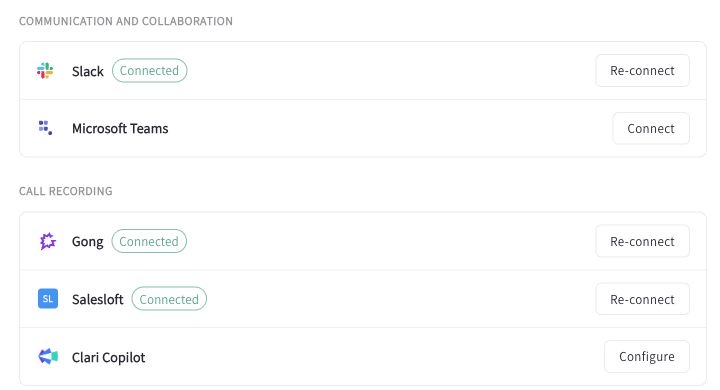
Connect call-recording and collaboration tools so conversation context can sit alongside structured business data in your analysis.
A connection brings the data. Shared definitions make it usable.
Agree on what a booking, customer, or conversion means before the analysis runs. QFlow's data dictionary and diagnostics make those assumptions reviewable.
- Map source fields to the business definitions your team uses.
- Surface missing or inconsistent inputs before they reach a forecast.
- Roll up multiple entities or system instances without a migration project.
Review the definitions and diagnostics before approving the inputs.
Bring the AI you already use
Connect once. Build on the same business context.
QFlow Desktop connects Claude and Codex through MCP. Recipes run the calculations and quality checks. Published skills give your team a shared, versioned playbook for repeating the work.
Explore QFlow DesktopPut the result where decisions happen.
Deliver recipe-driven analysis through Slack, Teams, email, or a webhook. Use the same governed definitions for the briefing, the forecast review, and the next round of questions.
Explore recurring briefingsBefore you connect
Do we need a warehouse or a new CRM?
No. QFlow connects to operational and financial systems directly. If you already use a warehouse, database, or analytics platform, those can also supply data. Start with the systems and business questions that matter to your team.
Can we combine multiple instances of the same system?
Yes. QFlow supports multi-entity and multi-instance rollups, including separate Salesforce organizations. Keep the source systems in place while aligning definitions and reviewing performance across the business.
What does setup involve?
Authorize the relevant sources, review sync status and available history, and confirm the fields and definitions your analysis will use. Requirements depend on the source and its permissions. The integration view distinguishes connection, initial sync, and configuration so a connected account is not mistaken for a finished setup.
How do Claude and Codex use the connected data?
QFlow Desktop connects your AI tools through MCP, or Model Context Protocol. They can work with governed business context, QFlow tools, and verified recipe outputs. Published skills provide a repeatable playbook for recurring work while QFlow executes the calculations and checks.
Can results reach our team automatically?
Yes. Recipes can deliver recurring analysis through Slack, Microsoft Teams, email, or a webhook. Keep the analytical definitions in the recipe and send the result to the channel where your team acts on it.
Start with your systems and your next business question.
Review the connections, definitions, and history that question needs.
Discuss your data stackReview our security and privacy information or visit the Trust Center.