Account-based attribution
See the journey. Understand the outcome.
Connect campaign and account activity with unstructured data from call recordings, emails, and notes. Use AI-powered win/loss insights to learn what buyers value, where objections arise, and how to sharpen your marketing.
Open the interactive tour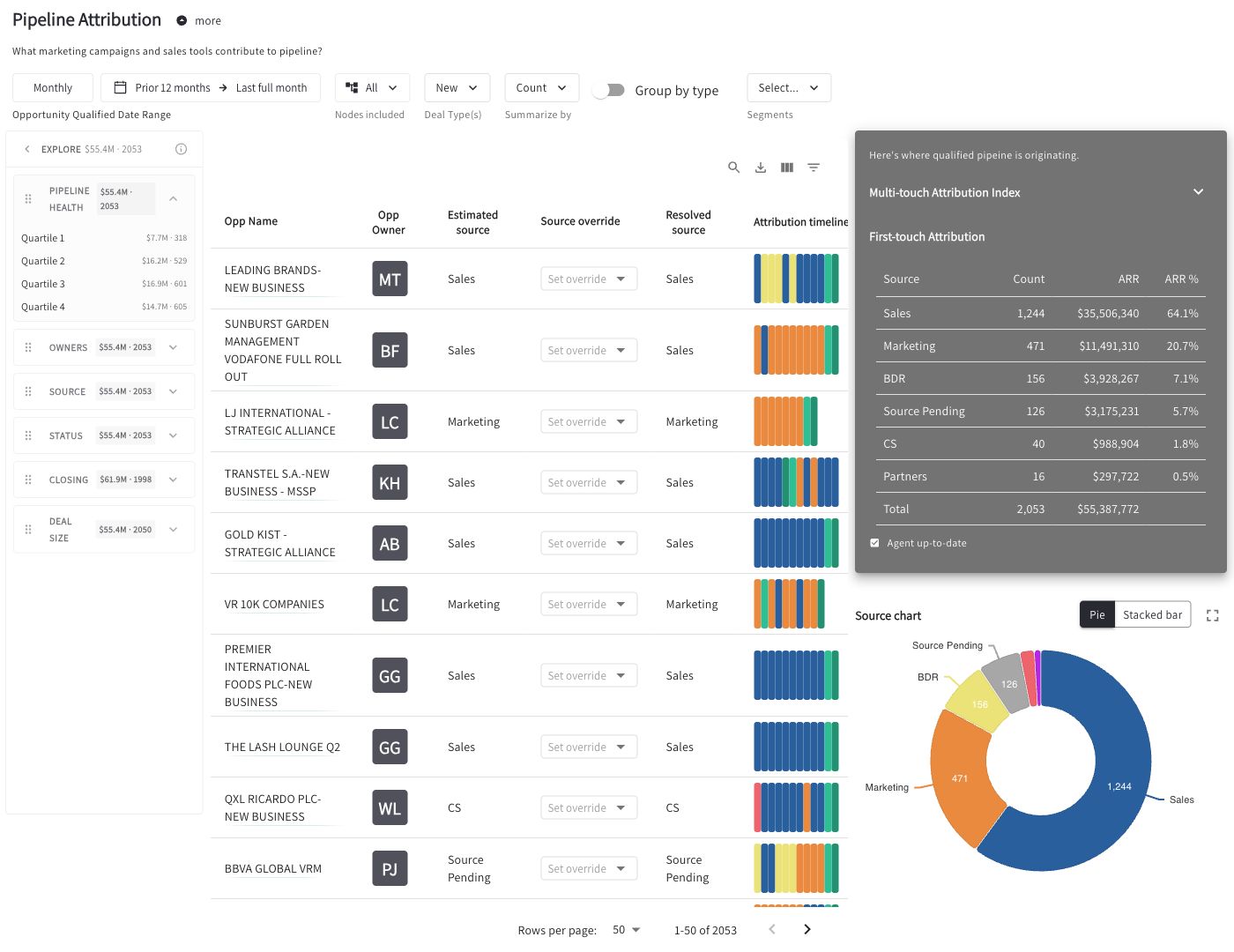
Connect source totals to the opportunities and activity behind them. Inspect the buying journey alongside attribution before deciding which programs deserve more attention.
Trusted by







Turn buyer conversations into marketing insight.
Bring call recordings from Gong, Salesloft, and Clari Copilot together with email activity, CRM notes, and opportunity outcomes.
That unstructured data captures the needs, objections, and competitive context behind the buying journey. Connect what people said with the account, campaign activity, and deal outcome.
- Gong
- Salesloft
- Clari Copilot

AI-powered win/loss insights
Choose the source fields and reason categories for your business. QFlow analyzes the selected transcripts, summaries, and notes to derive win/loss reasons with explanations and supporting evidence.
- Inspect the reasoning behind each classification.
- Compare themes across won and lost deals and segments.
- Trace patterns back to the underlying opportunities.
Keep the conversations connected to the journey.
Move from a source total to an opportunity, then into its account activity. Review first-touch attribution alongside the sequence of campaign and sales interactions, and use the available conversation evidence to investigate the outcome.
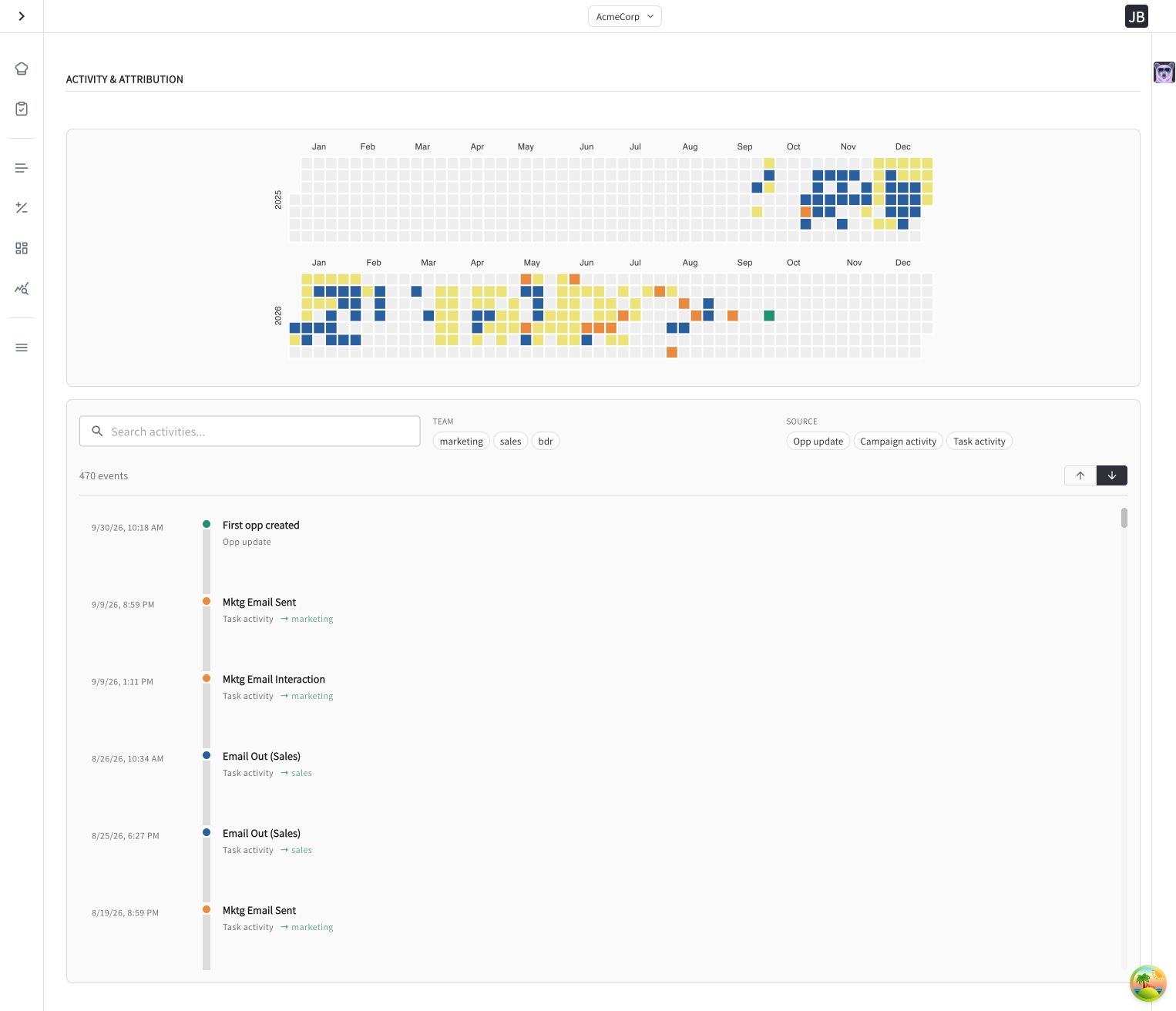
Follow marketing and sales interactions through an account’s timeline. Account Lens (beta) keeps activity dates and context together for deal and win/loss investigation.
Make the rules part of the review.
An attribution result depends on which people, interactions, and dates you include. Set those choices to reflect your sales motion, then use them consistently.
Missing contact relationships or activity history affect what the model can explain. Review those gaps before treating a source total as the whole story.
- Whose activity counts
- Use the contacts listed on an opportunity, or include contacts across the account. Make that relationship explicit before comparing results.
- How far back to look
- Set the look-back period and the inactivity window that separates stretches of engagement. Keep earlier activity in context when a buying journey crosses the cutoff.
- Which interactions to include
- Configure campaign participation and response rules, then group activity using the campaign fields your team relies on.
Put buyer insight to work in your marketing.
Use attribution to understand where pipeline comes from, and win/loss evidence to investigate what buyers respond to. Bring those findings into your next messaging, content, and campaign review.
Sharpen your messaging
Find recurring buyer priorities and objections in the evidence behind wins and losses. Use those themes to choose which value propositions and content to test.
Strengthen competitive content
Review the alternatives buyers mention and the reasons recorded for lost deals. Use the findings to update battlecards, proof points, and objection-handling content.
Improve campaign decisions
Compare source and segment outcomes, investigate the deal-level reasons, and review recorded campaign spend. Choose the next audience, message, or investment to test.
A closer look at attribution
What makes this account-based attribution?
QFlow connects activity to opportunities through the people involved. You can use contacts listed on the opportunity or contacts across the account. That gives you a view of the recorded buying-group activity behind a deal, with the relationship rules kept explicit.
Which call recording integrations can we use?
QFlow integrates with Gong, Salesloft, and Clari Copilot. Bring available call transcripts and summaries into the opportunity context alongside CRM activity, emails, and notes. The content available depends on the connected platform, its permissions, and the records associated with each opportunity.
How does AI turn unstructured data into win/loss insights?
Select the source fields and win/loss categories that fit your business. QFlow can analyze call transcripts and summaries, email activity, notes, and other selected opportunity fields to derive reasons for won and lost deals. Review the AI explanations and supporting evidence, then use recurring themes to guide messaging, competitive content, and campaign decisions.
Can we use the history already in our systems?
Yes. QFlow reconstructs activity from the available contact, lead, campaign, task, and connected marketing records. Call recordings and other unstructured sources add context to win/loss analysis. The history you can analyze depends on what those systems retain and how reliably the records connect to accounts and opportunities.
Can we choose our own attribution rules?
Yes. Configure contact relationships, look-back and inactivity windows, campaign response requirements, and campaign grouping. Use consistent rules and reporting periods when comparing sources, segments, or cohorts.
Does attribution prove a campaign caused revenue?
Attribution shows the recorded relationships between activity and opportunity outcomes under your selected rules. It does not establish incremental lift by itself. Use the evidence to decide what to investigate or test, and review campaign spend alongside the outcomes when discussing investment.
Bring the buyer’s voice into your next marketing decision.
Explore account-based attribution, call recording integrations, and AI-powered win/loss analysis in one walkthrough.